




Every AI agent shares the same habit: it explains before it answers, apologizes before it fixes, and pads the sentence with courtesy nobody asked for. "Sure, I'd be happy to help with that" isn't an answer, it's filler billed by the token.
This isn't a style problem. It's a financial and operational one. Every word of padding the model generates becomes an output token, and output tokens are the expensive part of the bill. Multiply that across hundreds of interactions a day, across an entire team using Claude Code or Codex, and the API invoice grows without the actual work getting any better.
Why "just be more concise" never fixed it
Asking AI to "answer more concisely" in the prompt works for one message, maybe two. Then the model drifts back to its default, because a brevity request doesn't become a persistent rule, it dissolves into the conversation.
caveman, an open source skill built by Julius Brussee, fixes this by treating concision as an installable behavior layer instead of a request you repeat every session. Once active, it rewrites how the agent speaks, without touching how it thinks.
The mechanism behind the cut
The skill targets four specific categories of excess: articles, filler words, performative courtesy ("I'd be happy to help"), and hedging, the throat-clearing an AI does before it actually gets to the point.
Tested against real Claude API data across ten technical prompts, the result was an average 65% reduction in output tokens, ranging from 22% to 87% depending on the task. Explaining a React re-render bug, for instance, dropped from 1,180 tokens down to 159 without losing the cause or the fix.
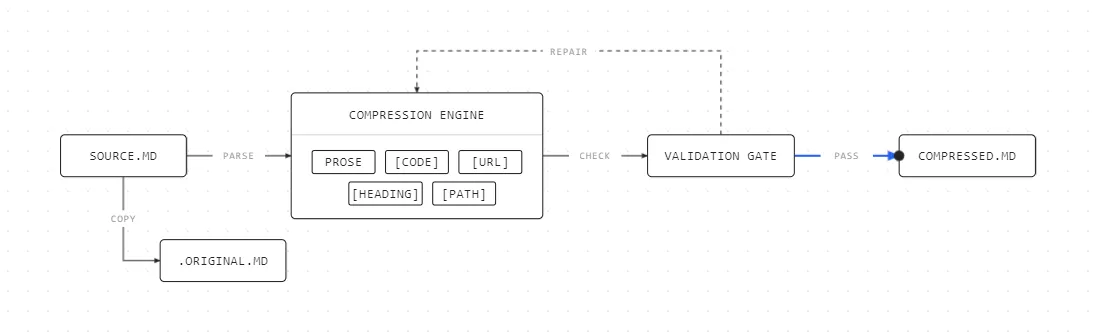
What separates this from just "cutting words for the sake of it" is where the skill refuses to touch. It protects specific elements, code blocks, URLs, headings, file paths, which pass through the rewrite untouched. And the model's internal reasoning, everything it processes before answering, stays at full size. Only the final reply shrinks.
How to install and activate it
Installation is a one-line command, and it works across Claude Code, Codex, Gemini CLI, Cursor, Windsurf, Copilot, and 30+ other agents:
irm https://raw.githubusercontent.com/JuliusBrussee/caveman/main/install.ps1 | iexcurl -fsSL https://raw.githubusercontent.com/JuliusBrussee/caveman/main/install.sh | bashAfter it's installed, activate it by typing /caveman or simply asking the agent to "speak like a caveman" in the chat. There are several intensity levels, ranging from the lightest (just removes filler) to the most aggressive (telegraphic sentences). To disable it, just ask for "normal mode."
- /caveman – Activates the default mode (full).
- /caveman lite – Light compression. Removes fluff while keeping normal sentence structure.
- /caveman full – Default mode. Drops articles and uses shorter, more direct sentences.
- /caveman ultra – Maximum compression. Heavy use of abbreviations and a telegraphic writing style.
- /caveman wenyan – Experimental mode inspired by Classical Chinese.
- /caveman wenyan-lite – A more readable version of Wenyan mode.
- /caveman wenyan-ultra – Extremely compressed Wenyan mode.
In addition to the conversation modes, there are several sub-skills:
- /caveman-review – Performs an extremely concise code review, typically one line per issue.
Example:
L52 🔴 null dereference. Add guard.
L81 🟡 rename var. Improve clarity.
- /caveman-commit – Generates commit messages following the Conventional Commits specification.
Example:
feat(auth): add OAuth refresh flow
- /caveman-stats – Shows how many tokens you've saved by using the skill.
- /caveman-stats --share – Generates a shareable summary of your token savings.
- /caveman-compress CLAUDE.md or /caveman-compress AGENTS.md – Rewrites the file into "caveman" style to reduce token usage in future sessions, while creating a backup named <filename>.original.md.
- normal mode – Disables the skill and returns the agent to its normal behavior until you activate Caveman again.
The detail that keeps this from backfiring
The obvious worry is whether cutting words also cuts precision. The skill treats that as an explicit rule: in situations involving technical risk, security, or irreversible decisions, the response goes back to full length. Brevity is the default, not a priority that overrides everything else.
There's even automatic validation running underneath: the skill rewrites the text, then passes the result through a checker that confirms code, errors, and technical terms come out exactly right on the other side.
Next time you watch your AI agent spend three sentences saying what fit in one, the question isn't whether it was being polite. It's how much that politeness is costing, in reading time and in tokens, multiplied across everyone on your team who hasn't noticed it either.
Comments (0)
Comments are moderated and if they violate our Terms and Conditions of use, the comment will be deleted. Persistence in violation will result in a ban of your account.