




In a game, a skin changes how your character looks without changing their stats. Claude Code now has the same idea: a mod called Skins, built by developer hellosverre, that changes the look of the conversation and touches nothing the AI reads or does. It sounds purely cosmetic. But one part isn't: a strip above the prompt that shows how much of your context you've already used.
If you don't know what a mod is yet, start with this post:
In short, it's a change to the app itself, not just to the instructions you give the AI.
What Skins changes on screen
Claude Code works for minutes at a time: it opens files, edits them, runs commands. What you see is the trail it leaves. Skins organizes that trail. Each action gets an icon and the time it took, each edit becomes a card summarizing what changed, code and tables get their own cards, and terminal output goes into a card with a copy button.
In practice, after asking Claude to refactor a function, you see something like this:
An edit icon, the time it took and a card summarizing the change, something like +12 -3. Below it, the new code in a card with the language and syntax colors.
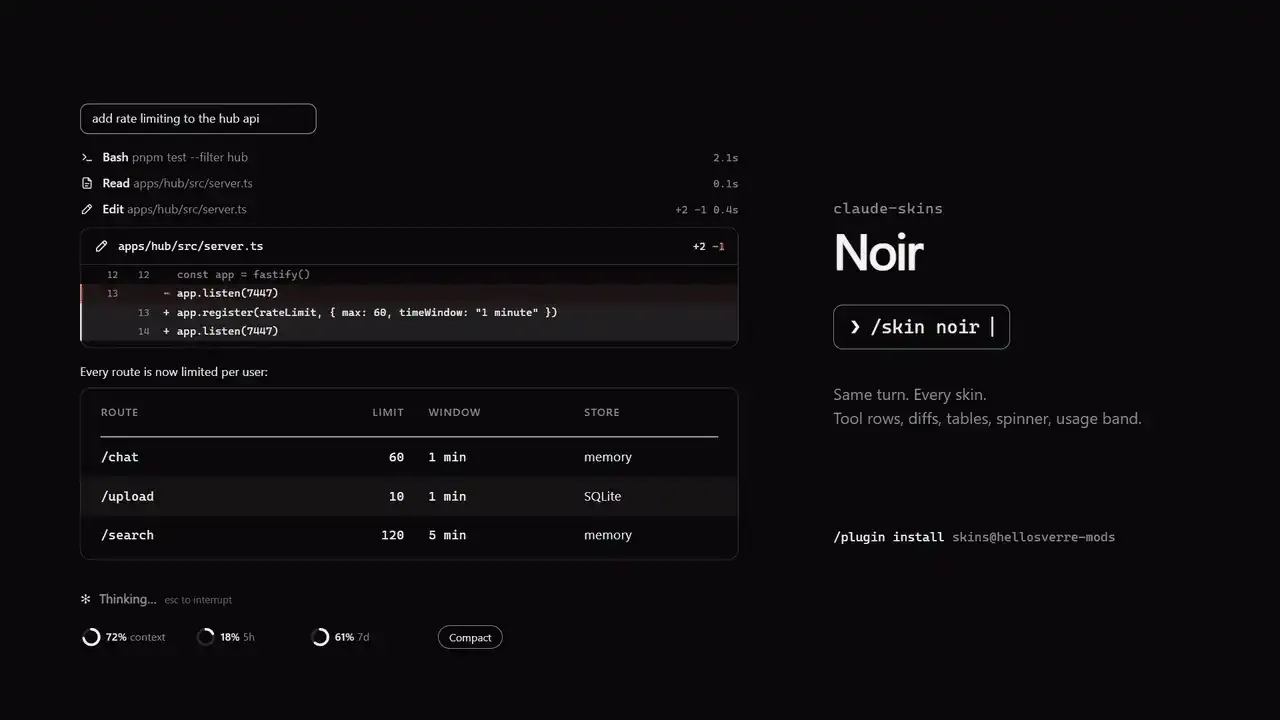
The strip that warns you when context is running out
Above the prompt you get two rings: one for context (the working memory of the conversation) and one for your plan limit. There's also a Compact button, which summarizes the conversation to free up space, and a warning once context passes 70%. It's the most useful part of the mod, because you stop finding out the conversation was full by the damage it causes.
Like a game skin, Skins changes the look, not the stats.
How to install it and switch themes
```
/plugin marketplace add hellosverre/claude-skins
/plugin install skins@hellosverre-mods
```
It works on Claude Code 2.1.287 or newer, in the terminal or the Code tab of the desktop app. After that, open the settings, with a live preview, or switch directly by theme name:
```
/skin
/skin <name>
/skin list
/skin off
```
Noir (the default, black and white), Tokyo Night, Dracula and Catppuccin, names anyone who uses a code editor already knows. Each skin has a light palette, used when your Claude Code is on a light theme, and your choice is saved across sessions. /skin off brings back the original look.
What doesn't change
The stored conversation and what the model reads stay intact. Agents, plan mode and the permission prompt keep their original look.
In a game, nobody wins a match because of a skin. But whoever sees better what's going on plays better. It's the same with AI: Skins doesn't make Claude smarter, it just makes you more aware of what it's doing.
Comments (0)
Comments are moderated and if they violate our Terms and Conditions of use, the comment will be deleted. Persistence in violation will result in a ban of your account.